
Where to go
Settings → Plan & billing
Before you start
Review your current plan, renewal date, and usage before changing anything.
Step by step
-
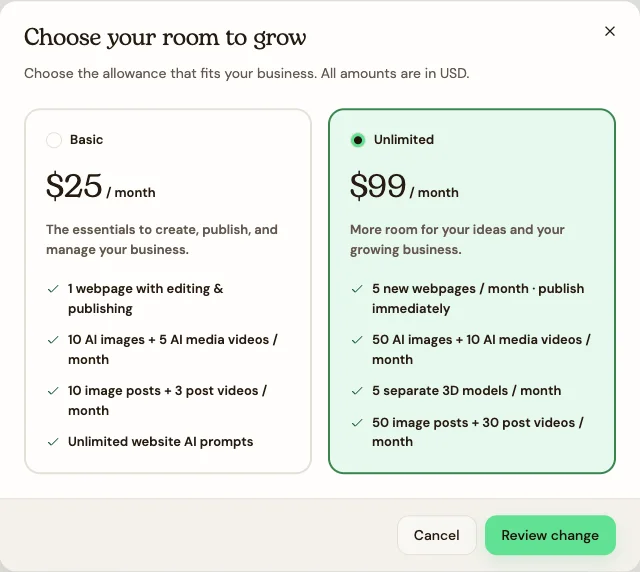
Use Change plan or Choose a plan. Select the plan and choose Review change. Read the price and effective date before confirming.
-
For a downgrade, review the lower allowances, effective date, and any extra pages first. Read the page-impact warning before confirming the change.
-
Choose Update payment to change your payment method. Use Edit in Billing details to update your invoice information separately from your public business profile.
-
Find Invoices and choose the download control beside the invoice you need.
-
To stop renewing, choose Cancel subscription, read the proposed end date, and review the confirmation. Cancelling a subscription and deleting an account are separate actions.
See the steps
Use these views to find the controls as you follow the guide.
What happens next
You know the proposed price, timing, and effect before confirming a billing change.
Helpful tips
-
For an upgrade, your current cycle’s consumed creation allowances carry over.
-
Do not assume a downgrade removes extra pages immediately. Review the actual warning and page impact before confirming.