
Where to go
My Media → Create with AI → Video
Before you start
My Media video allowance is separate from My Posts video allowance.
Step by step
-
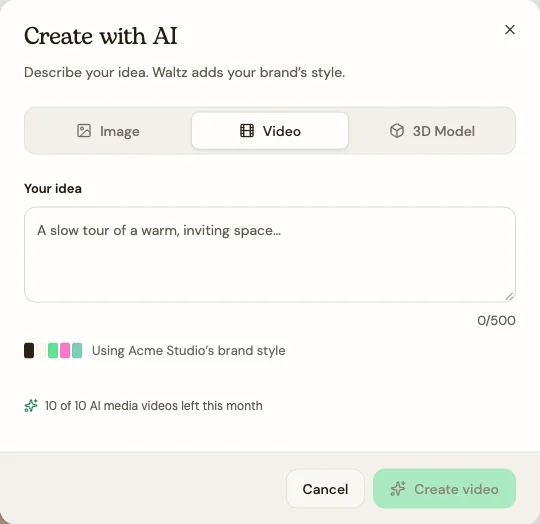
Choose Create with AI and select Video.
-
Write your idea in everyday language: what appears, what happens, and the mood you want. You have up to 500 characters.
-
Try: “A slow tour of a warm, inviting living room. Focus on natural materials and small details.”
-
Check the saved-brand context and choose Create video.
-
When it finishes, open the library entry and review the video before using it.
-
Rename the file and choose it from My Media where the website or creative picker supports video.
See the steps
Use these views to find the controls as you follow the guide.
What happens next
A video entry is available in My Media.
Helpful tips
-
Use My Posts → Video for a branded sharing-video brief with format, length, and voiceover controls.
-
Keep the idea focused on one scene or message. Watch the complete result and check the details before using it.